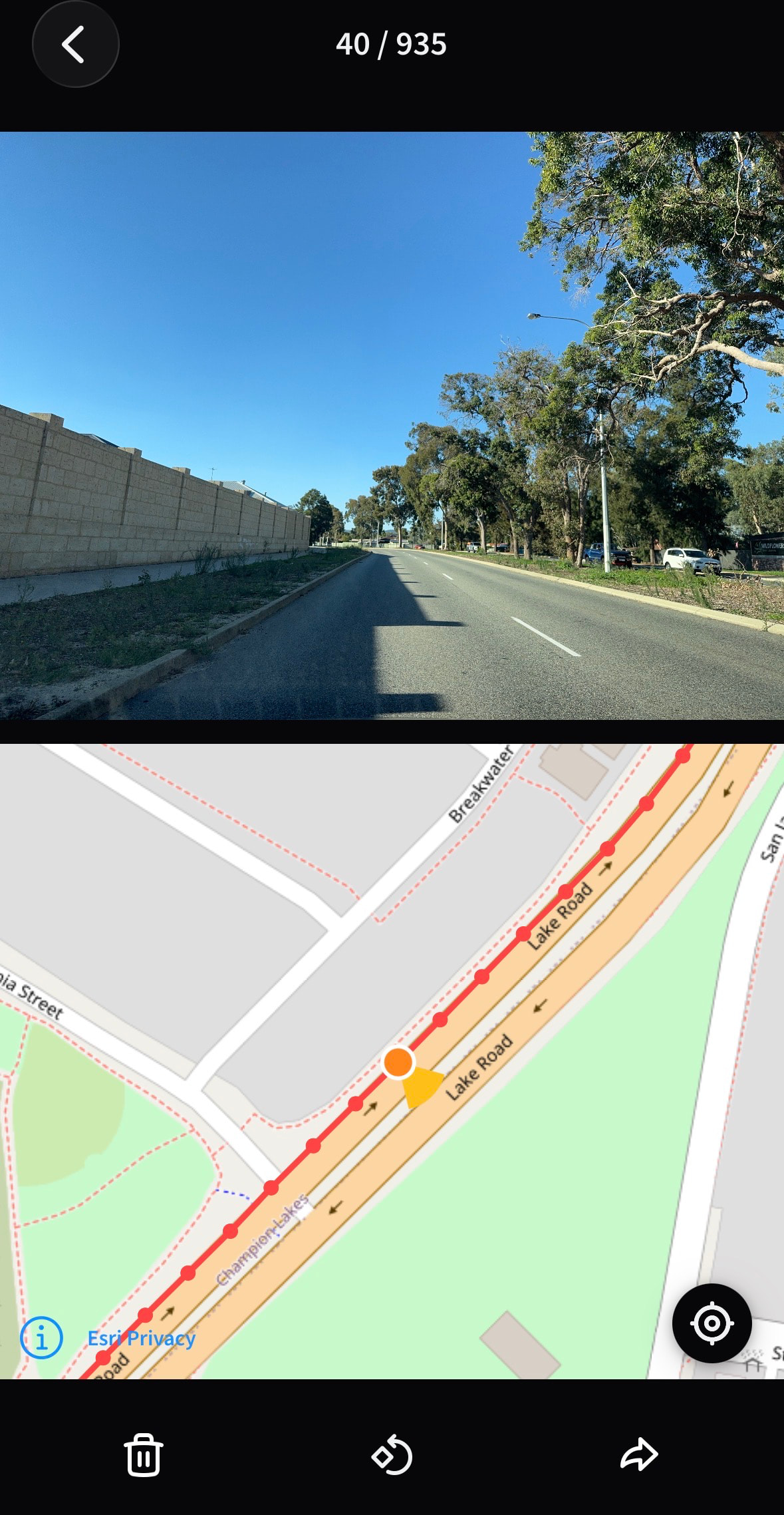
I’ve been wondering about the heading bug that’s been causing iOS app captures when travelling above walking speed to have a 90 degree heading offset for months now. The Mapillary algorithm figures out the correct direction, and a separate corrected FOV cone is shown while viewing an affected image after processing.
So is there any reason that the green cones on the map can’t all show the true heading instead of whatever the capture-device’s sensors erroneously showed? A couple of years ago, another bug had every direction flipped 180 degrees. Working with imagery on OpenStreetMap would be easier if the true heading was shown automatically.
I am not a Mapillary iOS code user, but given the CLI tools interpolates image direction from the motion of one frame to the next by default, the iOS code may have the facility to force it. Is there a interpolate direction option?
@wa_wheatbelt - yes, we are working on fixing this. When you say “Working with imagery on OpenStreetMap would be easier if the true heading was shown automatically.” - what environment are you looking at Mapillary imagery in, iD, or on Mapillary.com or something else?
Hi @boris and thanks for the comment. I’m mostly referring to using the iD editor for OSM. The trails of green cones all point in the direction of their image heading metadata instead of the direction that Mapillary’s algorithm has detected. So I don’t truly know which direction a Mapillary image in iD is facing without clicking on it, especially for those sequences that had a 180 degree offset. Hope that makes sense.
Got it - it looks like the iD editor is using the original exif orientation as opposed to the computed Mapillary orientation. We are working on a fix now to make the computed orientation significantly more reliable, and then we can submit a pull request for the iD editor to switch to show the computed orientation to fix the issue you’re describing. Please stay tuned
Me again. I forgot to mention this before, but Mapillary’s iOS app also shows the exif heading instead of the computed heading. Hopefully that could be changed as well.
I just released a new version of the iOS app which hopefully fixes any issues with image heading; both when capturing an image and also when viewing existing uploads (which now use the computed compass angle, CCA).
Sorry to report that it hasn’t fixed it for me. I used 6.11 through TestFlight today for some captures, but it still had the wrong heading. I just downloaded the app from the AppStore, and old captures that were affected by the bug are still showing the incorrect heading.
FYI, I’m using an iPhone 15 Pro, and I always keep iOS up to date.
Now, this is an unexpected move? I have asked for a computed sequences layer on the web app last year but not much has happened. And now, out with “the old”, in with “the new” so quickly for Android and iOS? Since neither GPS metadata nor computed values are always perfect (though computed values usually tend to be closer to the truth, if reconstruction works properly), I would rather prefer a toggle for both layers (perhaps in the filter menu?) in the web app than one layer (or dataset) over the other. Both datasets provide distinct value.
@GITNE we’re making the change because we are landing a fix that will make computed compass angle significantly more accurate than it was previously. On the web you’ll still be able to see both, for simplicity on the mobile clients I think we’ll start with just the computed (to replace just exif), and would love your feedback once the fix goes out in a couple weeks.
There are two compass angles we need to pay attention to
The recorded angle that is stored in the image (raw angle, pre-upload)
What is displayed on the map (computed angle, post upload)
The bug fix in the latest app update addresses #1. If you do a new capture with the latest update, and before uploading, open the capture and look at the compass angle for a few photos, do they look correct or are they 90 degrees off?
#2 is also addressed, in the sense that it displays the computed compass angle, which might or might not be correct.
Regarding the existing capture that you linked, I think it looks correct to me (the computed compass angle, not the original angle, that is unchanged).
I managed to reproduce the 90 degree error you have been experiencing on my iOS 26 device. It seems Apple changed how compass angle works on iOS 26.
On previous iOS versions, we had to add 90 degrees to compensate for landscape mode, but on iOS 26 it seems that this compensation is done on an OS level automatically, which IMO is much better, but in this case the compass angle was double-compensated. I normally do most of my testing on an iOS 18 device.
I will upload a build for Beta testing today hopefully. It would be great if you could test it before I roll it out to everyone. You don’t need to do a real capture though, just take 1-2 images manually and see how the compass angle looks.


 I have asked for a computed sequences layer on the web app last year but not much has happened. And now, out with “the old”, in with “the new” so quickly for Android and iOS? Since neither GPS metadata nor computed values are always perfect (though computed values usually tend to be closer to the truth, if reconstruction works properly), I would rather prefer a toggle for both layers (perhaps in the filter menu?) in the web app than one layer (or dataset) over the other. Both datasets provide distinct value.