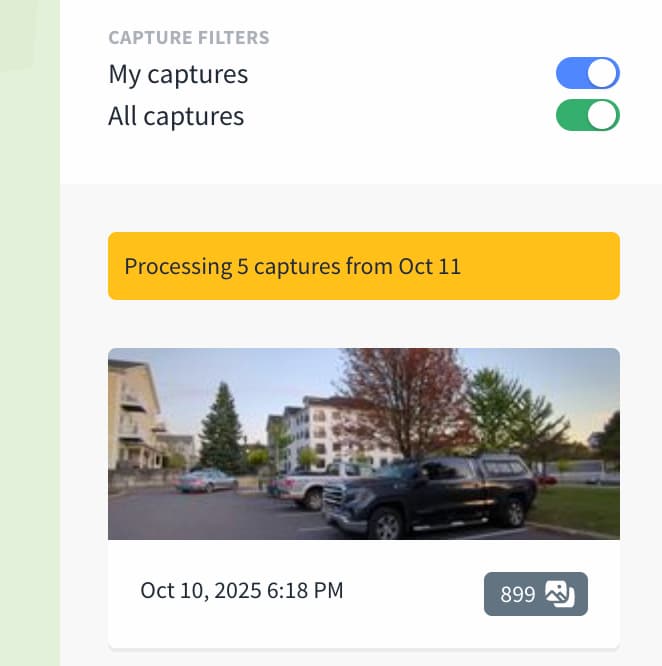
I uploaded 5 capture sequences from the Android mobile app yesterday but none of them have shown up in the web app yet. Normally I feel like I start to see them on the web fairly quickly although the processing doesn’t fully finish for a few days. This time I’m only seeing this yellow “Processing 5 captures from Oct 11” notice, but the captures themselves aren’t visible:
The captures are also not visible in the mobile app, and there the processing notice is not showing up either. It’s a little disconcerting as it feels like maybe something when wrong and the the images are all just gone. Is it normal that this just takes a while sometimes, or could there be an issue with my upload?
Thanks for the reply. It’s a relief to hear I’m not the only one! Waiting I can deal with, it’s just the “disappearance” of the captures that is stressing me out a little bit. Hopefully they will show back up eventually!
Before sending, you need to make copies and keep them for a month (or preferably forever). Otherwise, you can’t be sure that what you sent will arrive… at worst, you’ll waste time sending it twice.
Same here. I had not contributed for a while so I wasn’t quite sure how long it takes these days. I did notice that the uploads at least are very fast now!
Thank you all for your reports and for your patience. We’ve been experiencing significantly elevated traffic, which led to throttling during ingestion and subsequent timeouts in processing. We have since adjusted our capacity and are seeing recovery across all metrics.
The cleanup effort may take up to a day or two. However, all retries will be processed within the TTL of the harvested data, so no reuploads are required and no data will be lost.
We apologize for the inconvenience and the delay in our response. Thank you for being such an active and supportive community.
All my sequences are showing up now. Quite a relief they aren’t lost. I wish the Android app would wait to delete images off the phone until initial upload processing is complete. Rather nerve wracking for the images to not be visible anywhere during a delay like this.
I have a capture (4 photos) uploaded at 24 August 2025 and it is still in “map data processing”. Another capture has 139 photos, from 14 September 2025, and it has the same issue.
I’ve been reviewing my upload history and noticed that videos with more than 2800 GPX points are apparently not being processed by Mapillary and therefore remain yellow in the timeline. The difference between yellow and black videos isn’t immediately obvious to me. Since reducing video size requires several tedious steps, it would be helpful to know if this effort is actually worthwhile for contributors. Mapillary could internally split and then process recordings with more than 2800 nodes. I’m happy to grant permission for post-processing of large uploads.
Sequence image count has very little to do with the chance a sequence getting stuck in processing, despite it being a reasonable but naive assumption from a contributors point of view. It is a function of image density per area and load on the indexing service.
Apparently, 3D reconstruction (the “Map Data Processing” stage) is built on the same query mechanism as the public facing Mapillary API or its query mechanism is prone to the same limitations. Hence, if an area is too densely populated with images for a given query area and the indexing service is under too much load then 3D reconstruction queries just timeout and reconstruction seizes. Ergo, a sequence gets stuck in processing.
However, there is hope for improvement on the way: