Try toggling on the wide angle camera in Mapillary app which will capture significantly more of the street than the traditional camera. This is great for street level imagery as you’ll be able to capture more context for both sides of the street.
However, one of the challenges with using wide angle cameras is that if you are mounting your phone inside a car the wide angle will capture a significant amount of the dashboard and hood (and even parts of the phone mount itself) instead of the street. In order to avoid this you want to mount the phone as close as possible to the windshield. Traditional phone mounts include arms which make it difficult to this.
We’ve just tested this inexpensive “360” mount from AliExpress (~$6 shipped) which solves this problem by allowing you to mount the phone very close to the windshield because it doesn’t have a traditional arm. The mount itself is not extremely high quality, but it is “good enough” and most importantly well suited for Mapillary use with wide angle support (it also helps that its inexpensive and globally available). You can also find additional vendors selling the same mount on AliExpress by searching for “360 phone mount”
Here are a couple photos of how it looks mounted. Let us know your experiences with this mount or if you have other mounts that have solved this problem well for you.
Thanks for sharing! Yes, I think on the overall the trade-off is well worth it (if you can actually capture more of the street and not more of your car hood or dashboard) - which should be possible with this particular phone mount.
@boris I know it’s not ideal to capture the bonnet/hood of the car in the frame, but is it okay if it means I’m also capturing more to the left and right? Mapillary knows to disregard that part of the image, right? Is it a worthwhile compromise if I’m travelling through a complex area?
Good call @GITNE , I’ve just updated the help center article to include this mount as our top pick.
@wa_wheatbelt - I would say its OK to capture a little bit of the bonnet/hood if it means significantly wider angle coverage (on the left and right), so yes, likely a worthwhile compromise.
BTW, I recently came to a similar question. In Madagascar, it is not really possible to use a GoPro Max on top a vehicle. For long range travels, the luggage is mounted on the roof rack, blocking the view to the rear. In hinterland tracks, the tree branches will damage the camera. In cities, the risk of theft is significant. So, I tried to install the GoPro behind the windshield with a dedicated holder but I’m not very satisfied with the result (large part of the car in the field of view):
Other holder compatible with GoPro and allowing to put the camera as close as possible to the windshield would be welcome.
@Eric_S That’s very nice imagery otherwise, and such a beautiful location.
I recently bought a Ram mount for my smartphone, and it allows me to place my phone extremely close to the glass. They make GoPro mounts too. May I suggest you make a separate post to ask if anyone has experience using a Ram mount for a situation like yours? They’re pricey mounts, but very solidly built.
@boris I’ll do my best to take a photo tomorrow. Here’s a link to the model I bought. My understanding is that the short arm helps to minimise vibrations, which is why I didn’t get the longer mount.
Super, thank you! I’m particularly interested to see how you’re able to get your phone close to the windshield with this mount (and whether you’re then able to use the wide-angle mode on the Mapillary app without capturing too much of the car hood/interior.
Nonetheless, beautiful imagery. I appreciate that you went the extra mile to put black cloth on the dashboard to reduce glare from the windshield.
Perhaps you can mount the GoPro on the bonnet/hood right behind the windshield? This way, the camera is always going to be in your sight and you can unmount it whenever you leave the car. When using the camera on the car body, make sure to always use the plastic transparent lens cap(s) that come with the camera to protect the glass lens(es)! You will also have to clean the plastic lens caps ever so often. DO NOT wipe or scrape the plastic lens caps! Dip them in soapy (or dishwashing detergent; not to confuse with dish washing machine detergent) lukewarm warm water to clean them. Eventually, they will fade or become stale anyway due to dust’s abrasive nature on plastic surfaces at car speeds. This is what they have been designed for and their normal lifecycle.
It’s blurry due to low light, and possibly something on my windscreen, but this is an early attempt at using the ultrawide lense on my iPhone. I angled the camera upwards a bit. Next time I’ll try keeping it level.
Nice! I’m not sure the blurriness is due to the low light - try turning off infinity focus in settings and then turning it back on to reset the focal distance - let us know if that helps.
Here’s my setup. Having my screen partially covered hasn’t been an issue, and it helps to avoid distractions while driving.
I’ve adjusted the distance from the glass, as having it too close seemed to cause more trouble with reflections. Still, it’s closer than it looks in the photo.
Yes, it looks nice. I do not remember if I tried that setup. The problem with smartphones was that they did not capture turns. One of the problems I should say. I tried all kind of things to reduce reflections. My latest invention is to put a big black jacket high on the passenger seat. The things I tried to reduce reflection were also reflected. But after a while one just learns to live with it. I just did not want to buy another kind of car for Mapillary sake.
Do not forget to glue the rubbers or you will lose them.
Indeed, this RAM mount looks high quality and sturdy. Please note that you can also mount the suction cup below the phone and thus get a higher capture position, closer to the roof (and windshield). A few centimeters can do wonders. This should enable you to have the phone more level with the horizon and capture less hood/bonnet. You can also rotate the phone 180° to have the cable attach on the left side, if cable length is an issue. Do not worry too much about the fact that the camera is going to be a bit off center to the right. This camera position should still be fine or good enough (unless you cannot live with it).
This slightly off center right position may also have another advantage; namely that should the suction cup fail there may be a greater chance that the entire rig will fall on a soft(er) passenger seat rather than on a hard floor. It is always a good idea to position the passenger seat for such an eventuality.
As always, do not leave your phone in the car for extended periods of time in direct sunlight! Phones are not made for this but just for making a handful of images at basically room temperature.
Avoid also camera sensor burn-in through extended direct sun radiation (may cause dead sensor cells which manifests in static black pixels). Although modern phones have coated lenses to avoid sensor burn-in, the lenses are tiny and thus also the coatings which ultimately offers only limited protection. Dedicated cameras are a different “caliber” and are usually mostly safe.


 I appreciate that you went the extra mile to put black cloth on the dashboard to reduce glare from the windshield.
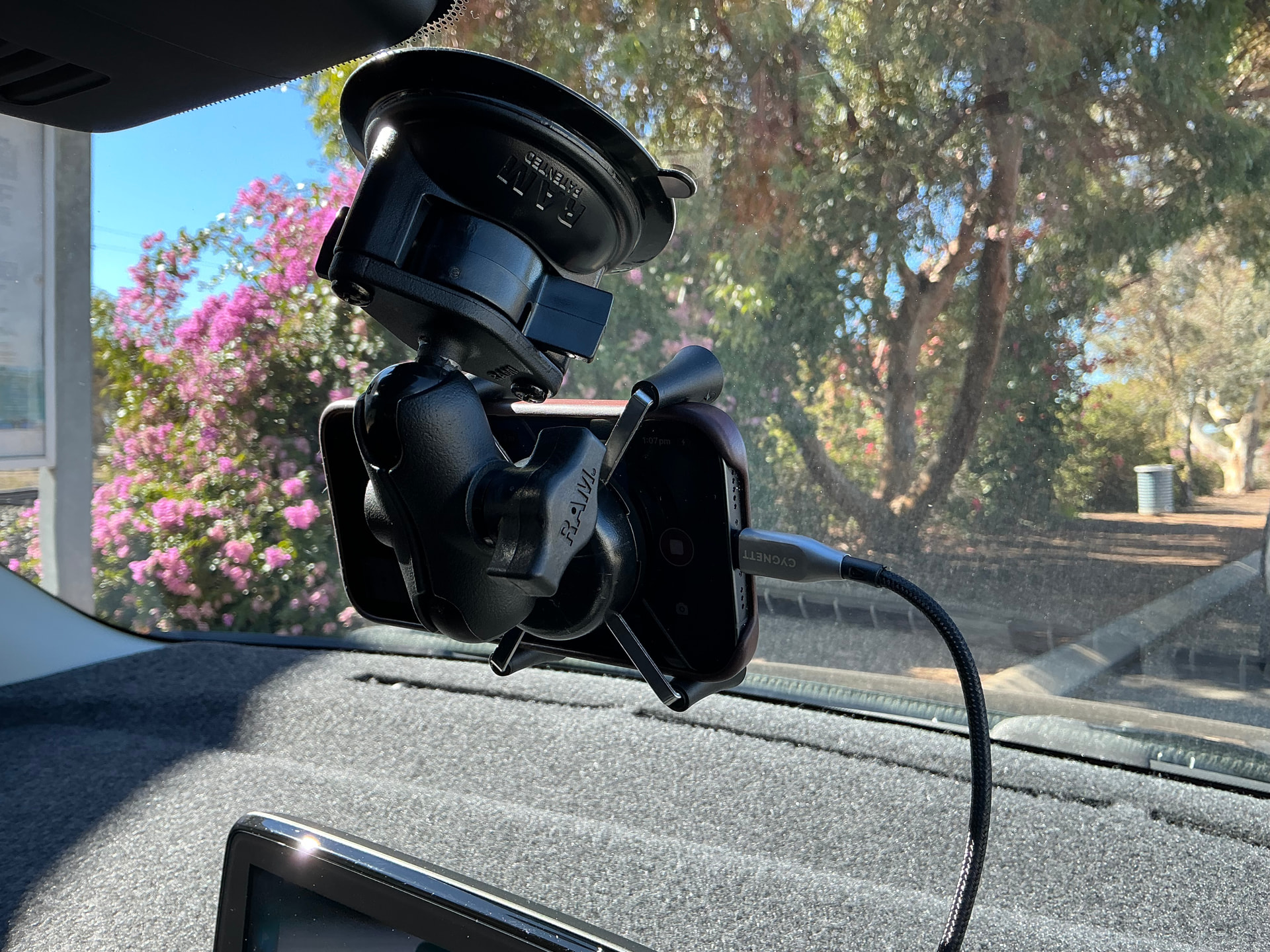
 This should enable you to have the phone more level with the horizon and capture less hood/bonnet. You can also rotate the phone 180° to have the cable attach on the left side, if cable length is an issue. Do not worry too much about the fact that the camera is going to be a bit off center to the right. This camera position should still be fine or good enough (unless you cannot live with it).
 sunlight! Phones are not made for this but just for making a handful of images at basically room temperature.