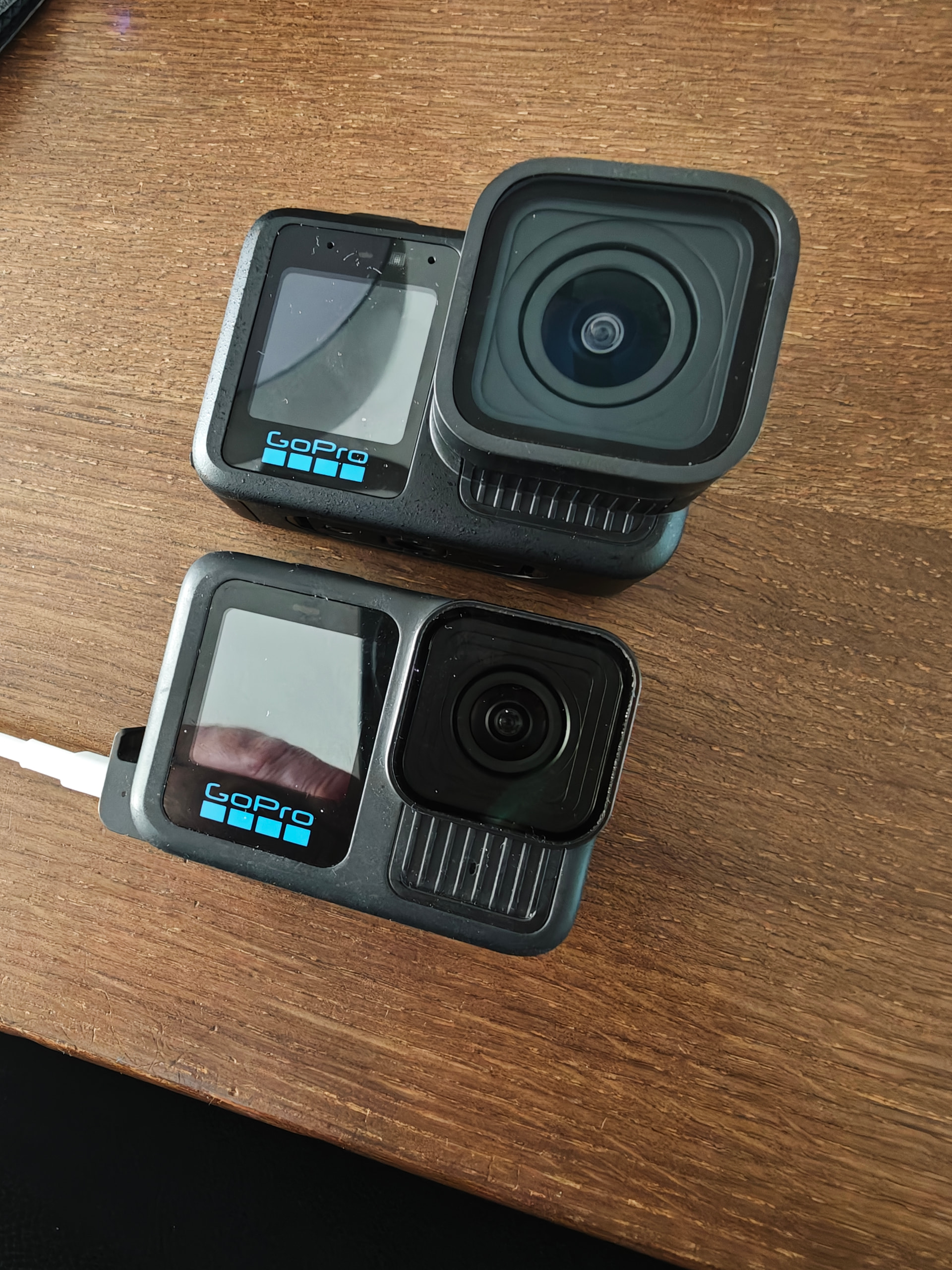
I compared an hour ago the Hero 13 and Mission 1 Pro with a drive in little diffuse sunlight, I put the json data in Gemini, you can find it below:
Remarks: Settings are the same, except the resolution (8K vs 4K).
Battery is slightly better, but not a big difference. The 8K recording is probably the reason.
{
  "hero13_HDR_meta.json": {
    "format_bitrate": "120002873",
    "duration": "564.960000",
    "firmware": "H24.01.02.10.00",
    "location": "+52.3592+005.4846/",
    "video": {
      "resolution": "3840x2160",
      "codec": "hevc",
      "profile": "Main 10",
      "color_space": "bt709",
      "color_transfer": "bt709",
      "color_primaries": "bt709",
      "bitrate": "119716444",
      "fps": "50/1"
    },
    "audio": {
      "codec": "aac",
      "sample_rate": "48000",
      "bitrate": "189252"
    },
    "telemetry_gpmd": {
      "bitrate": "74790"
    },
    "timecode_tmcd": {
      "present": true
    }
  },
  "hero13_no_HDR_meta.json": {
    "format_bitrate": "120068495",
    "duration": "267.260000",
    "firmware": "H24.01.02.10.00",
    "location": "+52.3488+005.4955/",
    "video": {
      "resolution": "3840x2160",
      "codec": "hevc",
      "profile": "Main 10",
      "color_space": "bt709",
      "color_transfer": "bt709",
      "color_primaries": "bt709",
      "bitrate": "119801162",
      "fps": "50/1"
    },
    "audio": {
      "codec": "aac",
      "sample_rate": "48000",
      "bitrate": "189254"
    },
    "telemetry_gpmd": {
      "bitrate": "58349"
    },
    "timecode_tmcd": {
      "present": true
    }
  },
  "mission1_HDR_meta.json": {
    "format_bitrate": "240495576",
    "duration": "384.000000",
    "firmware": "H26.01.01.10.00",
    "location": null,
    "video": {
      "resolution": "7680x4320",
      "codec": "hevc",
      "profile": "Main 10",
      "color_space": "bt2020nc",
      "color_transfer": "arib-std-b67",
      "color_primaries": "bt2020",
      "bitrate": "239995092",
      "fps": "50/1"
    },
    "audio": {
      "codec": "aac",
      "sample_rate": "48000",
      "bitrate": "253189"
    },
    "telemetry_gpmd": {
      "bitrate": "224702"
    },
    "timecode_tmcd": {
      "present": true
    }
  },
  "mission1_no_HDR_meta.json": {
    "format_bitrate": "240490100",
    "duration": "267.260000",
    "firmware": "H26.01.01.10.00",
    "location": null,
    "video": {
      "resolution": "7680x4320",
      "codec": "hevc",
      "profile": "Main 10",
      "color_space": "bt709",
      "color_transfer": "bt709",
      "color_primaries": "bt709",
      "bitrate": "239987265",
      "fps": "50/1"
    },
    "audio": {
      "codec": "aac",
      "sample_rate": "48000",
      "bitrate": "253191"
    },
    "telemetry_gpmd": {
      "bitrate": "226788"
    },
    "timecode_tmcd": {
      "present": true
    }
  }
}
Executive Summary
An analysis of the ffprobe JSON metadata reveals that the GoPro Mission 1 is not merely an incremental upgrade to the Hero 13, but a fundamentally different camera aimed at professional workflows. The most significant differences lie in the implementation of true broadcast-standard HDR, a massive increase in telemetry data volume, and double the video resolution and bitrate.
Below is a detailed technical comparison based on the extracted metadata streams.
1. Video Resolution & Bitrate
The primary video stream (hevc / H.265 Main 10 profile) shows a massive leap in raw capture capabilities:
-
Hero 13: Records in 4K (3840x2160) at exactly 50 fps, utilizing a bitrate of approximately 120 Mbps.
-
Mission 1: Records in 8K (7680x4320) at 50 fps, utilizing a bitrate of approximately 240 Mbps
2. HDR Implementation & Color Science
This is the most critical difference for colorists and post-production workflows. While both cameras shoot in 10-bit color depth (yuv420p10le), their approach to High Dynamic Range (HDR) is completely different:
-
Hero 13 (HDR Mode): The metadata flags the color space, color transfer, and color primaries all as bt709 (Rec.709). This indicates that the Hero 13 creates an internally tone-mapped “HDR-like” image, but forces it into a Standard Dynamic Range (SDR) color container.
-
Mission 1 (HDR Mode): The metadata correctly flags the color space as bt2020nc (Rec.2020) and the transfer function as arib-std-b67 (HLG - Hybrid Log-Gamma).
3. Embedded Telemetry (GPMF Data)
Both cameras embed a dedicated data stream (gpmd) containing the gyroscopic, accelerometer, and camera settings data.
-
Hero 13: The GPMD stream operates at a bitrate of ~58 to 75 kbps.
-
Mission 1: The GPMD stream operates at a significantly higher bitrate of ~225 to 226 kbps.
-
The Mission 1 records roughly three times the volume of telemetry data. This strongly implies a much higher polling rate (frequency) for the IMU sensors. For VFX artists and drone operators using stabilization software like Gyroflow, this denser data will result in significantly smoother and more accurate post-stabilization and camera tracking.
4. Audio Quality Allocation
Both cameras record stereo audio using the AAC codec at a 48 kHz sample rate (fltp), but the Mission 1 allocates more bandwidth to the audio stream:
5. Global Metadata & GPS Tracking
Looking at the global container tags (format-level metadata):
-
Hero 13: Displays clear, embedded GPS coordinates in the global header (e.g., location: "+52.3592+005.4846/").
-
Mission 1: The standard location tags are completely absent (null) in the MP4 headers.
-
There are two possibilities here: either the Mission 1 did not have a GPS satellite lock at the time of recording, or GoPro has restructured its firmware (H26.x vs the Hero 13’s H24.x) to hide GPS coordinates exclusively inside the complex binary GPMF stream rather than exposing them in the basic MP4 header.
6. Timecode Synchronization
-
Both Cameras: Both the Hero 13 and Mission 1 include a dedicated Timecode stream (codec_tag_string: "tmcd").
-
This confirms both cameras support timecode embedding, ensuring they can be synced effortlessly in multi-cam timelines.
[20:33:58] [mapillary_tools.exe] 20:33:58.338 - INFO - Extracting video information: ffprobe -print_format json -hide_banner -show_format -show_streams D:\Mapillary\Hero\Mission1_HDR.MP4
[20:33:58] [mapillary_tools.exe] Input #0, mov,mp4,m4a,3gp,3g2,mj2, from ‘D:\Mapillary\Hero\Mission1_HDR.MP4’:
[20:33:58] [mapillary_tools.exe] Metadata:
[20:33:58] [mapillary_tools.exe] major_brand : mp41
[20:33:58] [mapillary_tools.exe] minor_version : 538120216
[20:33:58] [mapillary_tools.exe] compatible_brands: mp41
[20:33:58] [mapillary_tools.exe] creation_time : 2026-05-30T17:44:47.000000Z
[20:33:58] [mapillary_tools.exe] firmware : H26.01.01.10.00
[20:33:58] [mapillary_tools.exe] Duration: 00:06:24.00, start: 0.000000, bitrate: 240495 kb/s
[20:33:58] [mapillary_tools.exe] Stream #0:00x1: Video: hevc (Main 10) (hvc1 / 0x31637668), yuv420p10le(pc, bt2020nc/bt2020/arib-std-b67), 7680x4320 [SAR 1:1 DAR 16:9], 239995 kb/s, 50 fps, 50 tbr, 50k tbn (default)
[20:33:58] [mapillary_tools.exe] Metadata:
[20:33:58] [mapillary_tools.exe] creation_time : 2026-05-30T17:44:47.000000Z
[20:33:58] [mapillary_tools.exe] handler_name : GoPro H.265
[20:33:58] [mapillary_tools.exe] encoder : GoPro H.265 encoder
[20:33:58] [mapillary_tools.exe] timecode : 19:44:47:14
[20:33:58] [mapillary_tools.exe] Side data:
[20:33:58] [mapillary_tools.exe] Display Matrix: rotation of -180.00 degrees
[20:33:58] [mapillary_tools.exe] Stream #0:1[0x2]: Audio: aac (LC) (mp4a / 0x6134706D), 48000 Hz, stereo, fltp, 253 kb/s (default)
[20:33:58] [mapillary_tools.exe] Metadata:
[20:33:58] [mapillary_tools.exe] creation_time : 2026-05-30T17:44:47.000000Z
[20:33:58] [mapillary_tools.exe] handler_name : GoPro AAC
[20:33:58] [mapillary_tools.exe] timecode : 19:44:47:14
[20:33:58] [mapillary_tools.exe] Stream #0:20x3: Data: none (tmcd / 0x64636D74) (default)
[20:33:58] [mapillary_tools.exe] Metadata:
[20:33:58] [mapillary_tools.exe] creation_time : 2026-05-30T17:44:47.000000Z
[20:33:58] [mapillary_tools.exe] handler_name : GoPro TCD
[20:33:58] [mapillary_tools.exe] timecode : 19:44:47:14
[20:33:58] [mapillary_tools.exe] Stream #0:30x4: Data: bin_data (gpmd / 0x646D7067), 224 kb/s (default)
[20:33:58] [mapillary_tools.exe] Metadata:
[20:33:58] [mapillary_tools.exe] creation_time : 2026-05-30T17:44:47.000000Z
[20:33:58] [mapillary_tools.exe] handler_name : GoPro MET
[20:33:58] [mapillary_tools.exe] Unsupported codec with id 0 for input stream 2
[20:33:58] [mapillary_tools.exe] Unsupported codec with id 98314 for input stream 3
[20:33:58] [mapillary_tools.exe] 20:33:58.374 - INFO - Extracting video metdata
[20:34:08] [mapillary_tools.exe] Extracting videos: 0%| | 0/1 [00:00<?, ?videos/s]
[20:34:08] [mapillary_tools.exe] Extracting videos: 100%|##########| 1/1 [00:09<00:00, 9.80s/videos]
[20:34:08] [mapillary_tools.exe] Extracting videos: 100%|##########| 1/1 [00:09<00:00, 9.84s/videos]
[20:34:08] [mapillary_tools.exe] 20:34:08.225 - INFO - Found total 3833 GPS points
[20:34:08] [mapillary_tools.exe] 20:34:08.225 - INFO - Extracting video samples
[20:34:08] [mapillary_tools.exe] 20:34:08.227 - INFO - Extracting video samples
[20:34:08] [mapillary_tools.exe] 20:34:08.261 - INFO - Found total 19200 video samples
[20:34:08] [mapillary_tools.exe] 20:34:08.261 - INFO - Interpolating video samples in the time range from 0.0 to 383.9
[20:34:08] [mapillary_tools.exe] 20:34:08.319 - INFO - Found total 19196 interpolated video samples
[20:34:08] [mapillary_tools.exe] 20:34:08.337 - INFO - Selected 5161 video samples by the minimal sample distance 1.2
[20:34:08] [mapillary_tools.exe] 20:34:08.351 - INFO - Running ffmpeg: ffmpeg -nostdin -hide_banner -i D:\Mapillary\Hero\Mission1_HDR.MP4 -map 0:0 -filter_script:v C:\Users\miche\AppData\Local\Temp\tmp7poj70ln -vsync 0 -frames:v 5161 -qscale:v 2 D:\Mapillary\Samples_Hero\Mission1_HDR.mly_ffmpeg_Mission1_HDR.MP4_24504_1780166048\Mission1_HDR_0_%06d.jpg
[20:34:08] [mapillary_tools.exe] -vsync is deprecated. Use -fps_mode
[20:34:08] [mapillary_tools.exe] Passing a number to -vsync is deprecated, use a string argument as described in the manual.
[20:34:08] [mapillary_tools.exe] Input #0, mov,mp4,m4a,3gp,3g2,mj2, from ‘D:\Mapillary\Hero\Mission1_HDR.MP4’:
[20:34:08] [mapillary_tools.exe] Metadata:
[20:34:08] [mapillary_tools.exe] major_brand : mp41
[20:34:08] [mapillary_tools.exe] minor_version : 538120216
[20:34:08] [mapillary_tools.exe] compatible_brands: mp41
[20:34:08] [mapillary_tools.exe] creation_time : 2026-05-30T17:44:47.000000Z
[20:34:08] [mapillary_tools.exe] firmware : H26.01.01.10.00
[20:34:08] [mapillary_tools.exe] Duration: 00:06:24.00, start: 0.000000, bitrate: 240495 kb/s
[20:34:08] [mapillary_tools.exe] Stream #0:00x1: Video: hevc (Main 10) (hvc1 / 0x31637668), yuv420p10le(pc, bt2020nc/bt2020/arib-std-b67), 7680x4320 [SAR 1:1 DAR 16:9], 239995 kb/s, 50 fps, 50 tbr, 50k tbn (default)
[20:34:08] [mapillary_tools.exe] Metadata:
[20:34:08] [mapillary_tools.exe] creation_time : 2026-05-30T17:44:47.000000Z
[20:34:08] [mapillary_tools.exe] handler_name : GoPro H.265
[20:34:08] [mapillary_tools.exe] encoder : GoPro H.265 encoder
[20:34:08] [mapillary_tools.exe] timecode : 19:44:47:14
[20:34:08] [mapillary_tools.exe] Side data:
[20:34:08] [mapillary_tools.exe] Display Matrix: rotation of -180.00 degrees
[20:34:08] [mapillary_tools.exe] Stream #0:1[0x2]: Audio: aac (LC) (mp4a / 0x6134706D), 48000 Hz, stereo, fltp, 253 kb/s (default)
[20:34:08] [mapillary_tools.exe] Metadata:
[20:34:08] [mapillary_tools.exe] creation_time : 2026-05-30T17:44:47.000000Z
[20:34:08] [mapillary_tools.exe] handler_name : GoPro AAC
[20:34:08] [mapillary_tools.exe] timecode : 19:44:47:14
[20:34:08] [mapillary_tools.exe] Stream #0:20x3: Data: none (tmcd / 0x64636D74) (default)
[20:34:08] [mapillary_tools.exe] Metadata:
[20:34:08] [mapillary_tools.exe] creation_time : 2026-05-30T17:44:47.000000Z
[20:34:08] [mapillary_tools.exe] handler_name : GoPro TCD
[20:34:08] [mapillary_tools.exe] timecode : 19:44:47:14
[20:34:08] [mapillary_tools.exe] Stream #0:30x4: Data: bin_data (gpmd / 0x646D7067), 224 kb/s (default)
[20:34:08] [mapillary_tools.exe] Metadata:
[20:34:08] [mapillary_tools.exe] creation_time : 2026-05-30T17:44:47.000000Z
[20:34:08] [mapillary_tools.exe] handler_name : GoPro MET
[20:34:08] [mapillary_tools.exe] Stream mapping:
[20:34:08] [mapillary_tools.exe] Stream #0:0 → #0:0 (hevc (native) → mjpeg (native))
[20:34:08] [mapillary_tools.exe] Output #0, image2, to ‘D:\Mapillary\Samples_Hero\Mission1_HDR.mly_ffmpeg_Mission1_HDR.MP4_24504_1780166048\Mission1_HDR_0_%06d.jpg’:
[20:34:08] [mapillary_tools.exe] Metadata:
[20:34:08] [mapillary_tools.exe] major_brand : mp41
[20:34:08] [mapillary_tools.exe] minor_version : 538120216
[20:34:08] [mapillary_tools.exe] compatible_brands: mp41
[20:34:08] [mapillary_tools.exe] firmware : H26.01.01.10.00
[20:34:08] [mapillary_tools.exe] encoder : Lavf62.12.100
[20:34:08] [mapillary_tools.exe] Stream #0:0(eng): Video: mjpeg, yuv420p(pc, bt2020nc/bt2020/arib-std-b67, progressive), 7680x4320 [SAR 1:1 DAR 16:9], q=2-31, 200 kb/s, 50 fps, 50 tbn (default)
[20:34:08] [mapillary_tools.exe] Metadata:
[20:34:08] [mapillary_tools.exe] encoder : Lavc62.28.100 mjpeg
[20:34:08] [mapillary_tools.exe] creation_time : 2026-05-30T17:44:47.000000Z
[20:34:08] [mapillary_tools.exe] handler_name : GoPro H.265
[20:34:08] [mapillary_tools.exe] timecode : 19:44:47:14
[20:34:08] [mapillary_tools.exe] Side data:
[20:34:08] [mapillary_tools.exe] CPB properties: bitrate max/min/avg: 0/0/200000 buffer size: 0 vbv_delay: N/A
Example of sampled Mapillary_tools pictures (HDR enabled, but mapillary is not using the HDR data unfortunately, the HDR video is impressive!).
Left Mission 1, Right the Hero 13.
The sampled file size is 947,8 kB for Mission 1 and 393,1 kB for Hero 13.
Detailed screenshots of the video (on a non-HDR screen)
@boris No issues with Mapillary_tools and Mapillary desktop app, both are extracting the GPS data without any errors.
The GPS sampling rate is still 10 Hz, just like the Hero 13.
The HDR version of the Mission 1 is uploaded with the desktop uploader, I will upload the link when it’s processed, the same for a Youtube version.

 Looks like a replaceable/detachable lens system and a 1” sensor.
 First, MAX2. Next, MISSION 1…
 Oh, I am afraid it is going to be expensive, especially given the current state of global economy and the crazy bonanza we are all in…




 through in the examples. Did you set both cameras to identical EV compensation?
 Hey, this is great info! Thank you
  we are talking about GoPro here, doing things the GoPro way.
 There seems to be not much visible difference between the two on Mapillary. However, MISSION 1 is definitely capable of visibly much smoother color gradients than other GoPro cameras. It is probably due to how MISSION 1 handles color spaces internally. It also strongly suggest that the sensor readout is always in 10 bits per color component. The image processor does not seem to switch between 8 bit and 10 bit sensor readout for SDR and HDR respectively. All it seems to do is to down-sample to 8 bit for SDR content. This is good to know and a smart design decision on GoPro’s side.