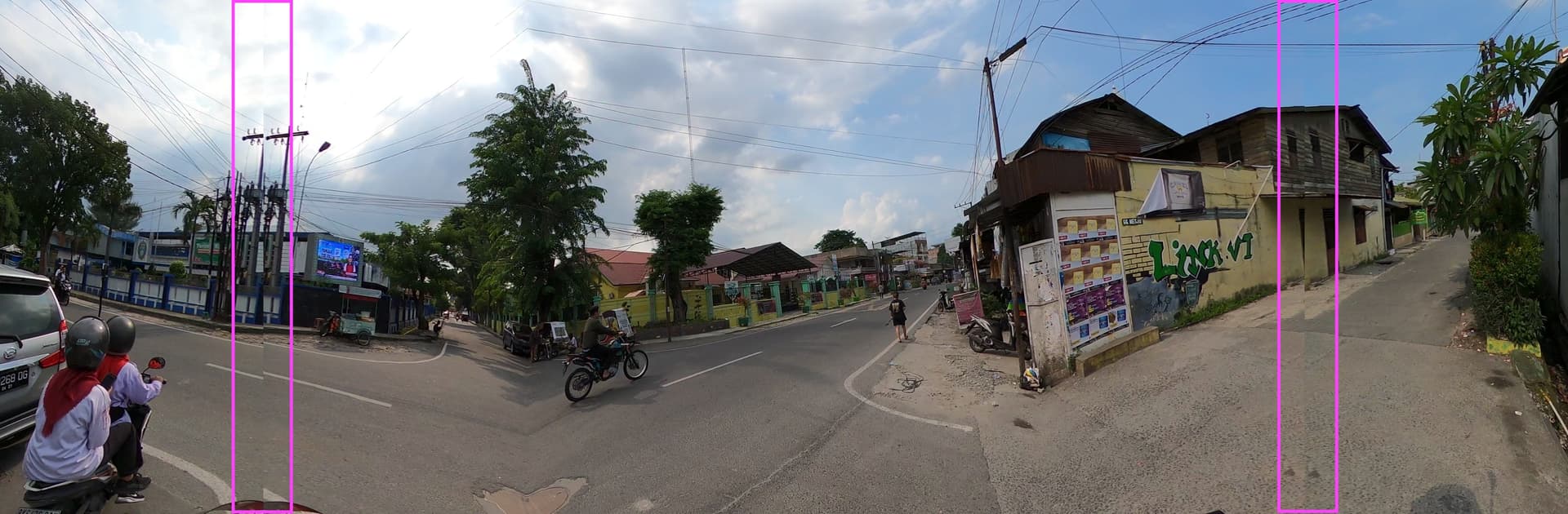
I’m trying to process video files locally to images. I need them to run an analysis workflow as a demo and we don’t have the bandwidth to get everything up to Mapillary and then downloaded again in time. The images that have gotten up to Mapillary look good (example) but when I run the local video_process there are 2 odd lines where the images jumps and repeats a small amount, like this:

Any thoughts as to how to keep that from happening?
Laptop is running macOS 14.6.1 (23G93) on Apple M2 Pro
I’m using mapillary_tools version 0.11.2
I have ffmpeg installed:
ffmpeg version 7.1 Copyright (c) 2000-2024 the FFmpeg developers
  built with Apple clang version 15.0.0 (clang-1500.3.9.4)
Here’s the terminal output:
(venv_mapillary) ➜  GoPro06 mapillary_tools video_process AM/ gopro6_22_am_images/ --video_sample_distance 8
2024-10-23 09:47:58,154 - INFO    - Extracting video information: ffprobe -print_format json -hide_banner -show_format -show_streams AM/GS090005.360
[mov,mp4,m4a,3gp,3g2,mj2 @ 0x14c704750] All samples in data stream index:id [4:5] have zero duration, stream set to be discarded by default. Override using AVStream->discard or -discard for ffmpeg command.
Input #0, mov,mp4,m4a,3gp,3g2,mj2, from 'AM/GS090005.360':
  Metadata:
    major_brand     : mp41
    minor_version   : 538120216
    compatible_brands: mp41
    creation_time   : 2024-10-22T09:58:59.000000Z
    location        : -07.2713+112.7478/
    location-eng    : -07.2713+112.7478/
    firmware        : H19.03.02.02.00
  Duration: 00:06:43.58, start: 0.000000, bitrate: 66348 kb/s
  Chapters:
    Chapter #0:0: start 389.222000, end 399.482000
    Chapter #0:1: start 399.482000, end 403.584000
  Stream #0:0[0x1](eng): Video: hevc (Main) (hvc1 / 0x31637668), yuvj420p(pc, bt709), 4096x1344 [SAR 1:1 DAR 64:21], 29973 kb/s, 23.98 fps, 23.98 tbr, 24k tbn (default)
      Metadata:
        creation_time   : 2024-10-22T09:58:59.000000Z
        handler_name    : GoPro H.265
        vendor_id       : [0][0][0][0]
        encoder         : GoPro H.265 encoder
        timecode        : 11:02:39:04
  Stream #0:1[0x2](eng): Audio: aac (LC) (mp4a / 0x6134706D), 48000 Hz, stereo, fltp, 189 kb/s (default)
      Metadata:
        creation_time   : 2024-10-22T09:58:59.000000Z
        handler_name    : GoPro AAC
        vendor_id       : [0][0][0][0]
        timecode        : 11:02:39:04
  Stream #0:2[0x3](eng): Data: none (tmcd / 0x64636D74) (default)
      Metadata:
        creation_time   : 2024-10-22T09:58:59.000000Z
        handler_name    : GoPro TCD
        timecode        : 11:02:39:04
  Stream #0:3[0x4](eng): Data: bin_data (gpmd / 0x646D7067), 86 kb/s (default)
      Metadata:
        creation_time   : 2024-10-22T09:58:59.000000Z
        handler_name    : GoPro MET
  Stream #0:4[0x5](eng): Data: none (fdsc / 0x63736466), 18 kb/s (default)
      Metadata:
        creation_time   : 2024-10-22T09:58:59.000000Z
        handler_name    : GoPro SOS
  Stream #0:5[0x6](eng): Video: hevc (Main) (hvc1 / 0x31637668), yuvj420p(pc, bt709), 4096x1344 [SAR 1:1 DAR 64:21], 29971 kb/s, 23.98 fps, 23.98 tbr, 24k tbn (default)
      Metadata:
        creation_time   : 2024-10-22T09:58:59.000000Z
        handler_name    : GoPro H.265
        vendor_id       : [0][0][0][0]
        encoder         : GoPro H.265 encoder
        timecode        : 11:02:39:04
      Side data:
        displaymatrix: rotation of nan degrees
  Stream #0:6[0x7](eng): Audio: pcm_s32le (in32 / 0x32336E69), 48000 Hz, ambisonic 1, s32, 6144 kb/s (default)
      Metadata:
        creation_time   : 2024-10-22T09:58:59.000000Z
        handler_name    : GoPro AMB
        vendor_id       : [0][0][0][0]
Unsupported codec with id 0 for input stream 2
Unsupported codec with id 98314 for input stream 3
Unsupported codec with id 0 for input stream 4
2024-10-23 09:48:08,583 - INFO    - Extracting video metdata
2024-10-23 09:48:16,858 - INFO    - Found total 6359 GPS points
2024-10-23 09:48:16,858 - INFO    - Extracting video samples
2024-10-23 09:48:16,860 - INFO    - Extracting video samples
2024-10-23 09:48:16,885 - INFO    - Found total 9668 video samples
2024-10-23 09:48:16,885 - INFO    - Interpolating video samples in the time range from 0.0 to 403.167625
2024-10-23 09:48:16,905 - INFO    - Found total 9667 interpolated video samples
2024-10-23 09:48:16,913 - INFO    - Selected 126 video samples by the minimal sample distance 8.0
2024-10-23 09:48:16,915 - INFO    - Extracting frames: ffmpeg -hide_banner -nostdin -i AM/GS090005.360 -map 0:0 -filter_script:v /var/folders/b6/3s_sztn53ls_77rt7bkhymy00000gn/T/tmpwd_c2h2v -vsync 0 -frames:0 126 -qscale:0 2 /Users/danbjoseph/Desktop/PMI street imagery/images/2024-10-22/GoPro06/gopro6_22_am_images/.mly_ffmpeg_GS090005.360_24421_1729651696/GS090005_0_%06d.jpg
-vsync is deprecated. Use -fps_mode
Passing a number to -vsync is deprecated, use a string argument as described in the manual.
[mov,mp4,m4a,3gp,3g2,mj2 @ 0x122805500] All samples in data stream index:id [4:5] have zero duration, stream set to be discarded by default. Override using AVStream->discard or -discard for ffmpeg command.
Input #0, mov,mp4,m4a,3gp,3g2,mj2, from 'AM/GS090005.360':
  Metadata:
    major_brand     : mp41
    minor_version   : 538120216
    compatible_brands: mp41
    creation_time   : 2024-10-22T09:58:59.000000Z
    location        : -07.2713+112.7478/
    location-eng    : -07.2713+112.7478/
    firmware        : H19.03.02.02.00
  Duration: 00:06:43.58, start: 0.000000, bitrate: 66348 kb/s
  Chapters:
    Chapter #0:0: start 389.222000, end 399.482000
    Chapter #0:1: start 399.482000, end 403.584000
  Stream #0:0[0x1](eng): Video: hevc (Main) (hvc1 / 0x31637668), yuvj420p(pc, bt709), 4096x1344 [SAR 1:1 DAR 64:21], 29973 kb/s, 23.98 fps, 23.98 tbr, 24k tbn (default)
      Metadata:
        creation_time   : 2024-10-22T09:58:59.000000Z
        handler_name    : GoPro H.265
        vendor_id       : [0][0][0][0]
        encoder         : GoPro H.265 encoder
        timecode        : 11:02:39:04
  Stream #0:1[0x2](eng): Audio: aac (LC) (mp4a / 0x6134706D), 48000 Hz, stereo, fltp, 189 kb/s (default)
      Metadata:
        creation_time   : 2024-10-22T09:58:59.000000Z
        handler_name    : GoPro AAC
        vendor_id       : [0][0][0][0]
        timecode        : 11:02:39:04
  Stream #0:2[0x3](eng): Data: none (tmcd / 0x64636D74) (default)
      Metadata:
        creation_time   : 2024-10-22T09:58:59.000000Z
        handler_name    : GoPro TCD
        timecode        : 11:02:39:04
  Stream #0:3[0x4](eng): Data: bin_data (gpmd / 0x646D7067), 86 kb/s (default)
      Metadata:
        creation_time   : 2024-10-22T09:58:59.000000Z
        handler_name    : GoPro MET
  Stream #0:4[0x5](eng): Data: none (fdsc / 0x63736466), 18 kb/s (default)
      Metadata:
        creation_time   : 2024-10-22T09:58:59.000000Z
        handler_name    : GoPro SOS
  Stream #0:5[0x6](eng): Video: hevc (Main) (hvc1 / 0x31637668), yuvj420p(pc, bt709), 4096x1344 [SAR 1:1 DAR 64:21], 29971 kb/s, 23.98 fps, 23.98 tbr, 24k tbn (default)
      Metadata:
        creation_time   : 2024-10-22T09:58:59.000000Z
        handler_name    : GoPro H.265
        vendor_id       : [0][0][0][0]
        encoder         : GoPro H.265 encoder
        timecode        : 11:02:39:04
      Side data:
        displaymatrix: rotation of nan degrees
  Stream #0:6[0x7](eng): Audio: pcm_s32le (in32 / 0x32336E69), 48000 Hz, ambisonic 1, s32, 6144 kb/s (default)
      Metadata:
        creation_time   : 2024-10-22T09:58:59.000000Z
        handler_name    : GoPro AMB
        vendor_id       : [0][0][0][0]
Stream mapping:
  Stream #0:0 -> #0:0 (hevc (native) -> mjpeg (native))
Output #0, image2, to '/Users/danbjoseph/Desktop/PMI street imagery/images/2024-10-22/GoPro06/gopro6_22_am_images/.mly_ffmpeg_GS090005.360_24421_1729651696/GS090005_0_%06d.jpg':
  Metadata:
    major_brand     : mp41
    minor_version   : 538120216
    compatible_brands: mp41
    firmware        : H19.03.02.02.00
    location        : -07.2713+112.7478/
    location-eng    : -07.2713+112.7478/
    encoder         : Lavf61.7.100
  Chapters:
    Chapter #0:0: start 389.222000, end 399.482000
    Chapter #0:1: start 399.482000, end 403.584000
  Stream #0:0(eng): Video: mjpeg, yuvj420p(pc, bt709, progressive), 4096x1344 [SAR 1:1 DAR 64:21], q=2-31, 200 kb/s, 23.98 fps, 23.98 tbn (default)
      Metadata:
        creation_time   : 2024-10-22T09:58:59.000000Z
        handler_name    : GoPro H.265
        vendor_id       : [0][0][0][0]
        timecode        : 11:02:39:04
        encoder         : Lavc61.19.100 mjpeg
      Side data:
        cpb: bitrate max/min/avg: 0/0/200000 buffer size: 0 vbv_delay: N/A
[out#0/image2 @ 0x6000013b06c0] video:114292KiB audio:0KiB subtitle:0KiB other streams:0KiB global headers:0KiB muxing overhead: unknown
frame=  126 fps=2.7 q=2.0 Lsize=N/A time=00:06:17.37 bitrate=N/A speed=8.05x
2024-10-23 09:49:04,585 - INFO    - Extracting video information: ffprobe -print_format json -hide_banner -show_format -show_streams AM/GS010005.360
[mov,mp4,m4a,3gp,3g2,mj2 @ 0x123e05930] All samples in data stream index:id [4:5] have zero duration, stream set to be discarded by default. Override using AVStream->discard or -discard for ffmpeg command.
 . Thank you for the answer.